How do I find a learning app without ads?
Read the app store’s advertising, purchase and privacy information, then try the app yourself before handing it to your child for practice.

Start by reading the App Store or Google Play description, then try the app yourself before your child uses it. Look for information about advertising, in app purchases and privacy. A few minutes with the app in your own hands will tell you more about the experience.
This takes a little time, but it is time spent once for each app. Afterwards, you have a clearer idea of what your child will encounter while practising.
Why can advertising interrupt learning?
An advertisement can pull attention away from the task. A child practising the clock needs to look at the clock. If an ad appears in the middle, they first have to work out what it is and then find their way back.
An ad may cover the part of the screen they need to tap. A small close button can be difficult to find, and tapping the wrong place may lead out of the app.
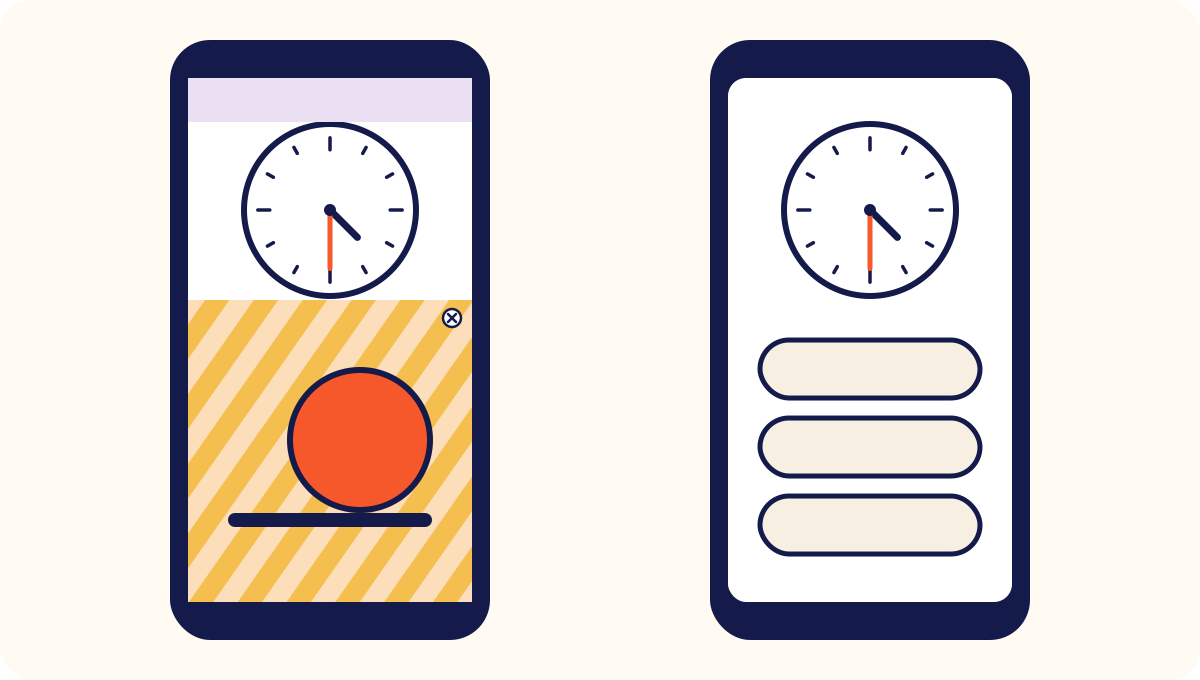
Purchase prompts can create a similar interruption. Buttons offering extra lives, levels or characters ask children to think about buying rather than learning. An app without in app purchases removes that particular choice.
What should you check before handing over the app?
Check three things: what the store says, how the app behaves and what information it asks for.
- The store listing. Read about ads, purchases and privacy. Look at which data the app collects and why.
- The experience. Use the app for ten minutes as your child would. Do ads appear? Are there links leading away or buttons encouraging a purchase?
- The setup. Does the child need to register, sign in or provide a name and email address to begin?
Also look at your device’s parental controls for purchases and downloads. Apps change through updates, so it is useful to check again occasionally.
If your child already uses an app you are unsure about, sit beside them next time and watch what appears. Talk about what an advertisement is. Agree that they can ask you when one appears instead of trying unfamiliar buttons.
Tonight, look through the apps your child uses most often. An app without advertising is not automatically a good learning app, but it gives you one less source of interruption to consider. We discuss how practice fits into the day in learning apps and screen time.
We wanted to offer a calmer alternative. Klokkeappen has no advertising or in app purchases. It is a paid app, and the store shows the price before downloading. You can also read about the people behind Klokkeappen and how we approach learning.